
Final Year Projects • Internships • Free Training
0%
Back to Projects
Major Project · Web Development

Speech to Sign Converter Project

Audio Speech to Sign Language Converter is a Django-based web application that converts spoken or typed text into Indian Sign Language animations. Users can sign up, log in, enter text manually, or use the microphone …

Difficulty Level
Advanced
Core Modules
6 Modules
Laptop frame

Project Overview

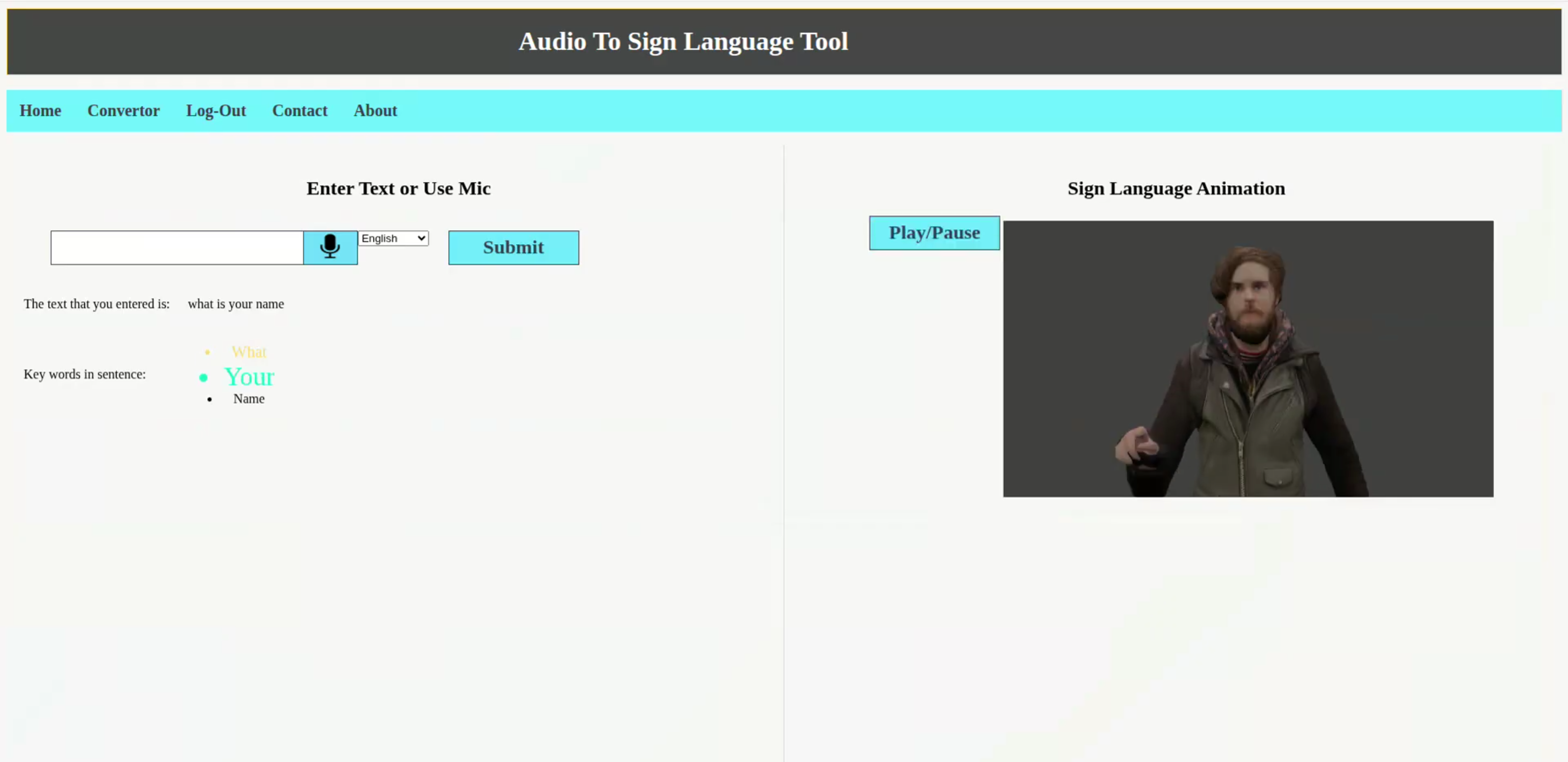
The Audio Speech to Sign Language Converter is a web-based application designed to reduce the communication gap between hearing users and people who rely on sign language. The system accepts spoken input through a browser microphone or typed text from the user, processes the sentence, extracts meaningful keywords, and displays the corresponding Indian Sign Language animation clips.

The project is developed using the Django web framework for backend routing, authentication, and page rendering. The frontend uses HTML, CSS, and JavaScript, while browser-based speech recognition is handled through the Web Speech API. Natural Language Toolkit (NLTK) is used for text preprocessing tasks such as tokenization, part-of-speech tagging, stop-word removal, tense detection, and lemmatization. The application also supports translation of entered text into English before processing, which helps users provide input in different supported languages.

After preprocessing, the system checks whether an animation clip is available for each processed word. If a complete word animation is not available, the word is broken into individual letters and the corresponding alphabet animations are displayed. This fallback approach ensures that the system can still provide visual output even when the exact word is not present in the animation dataset.

The application includes user registration, login, logout, static animation assets, an interactive converter page, and informational pages such as Home, About, and Contact. Overall, this project demonstrates how speech recognition, natural language processing, and web technologies can be combined to create an accessible communication aid using sign language animations.
Module Breakdown 6 Modules

Home Page Module
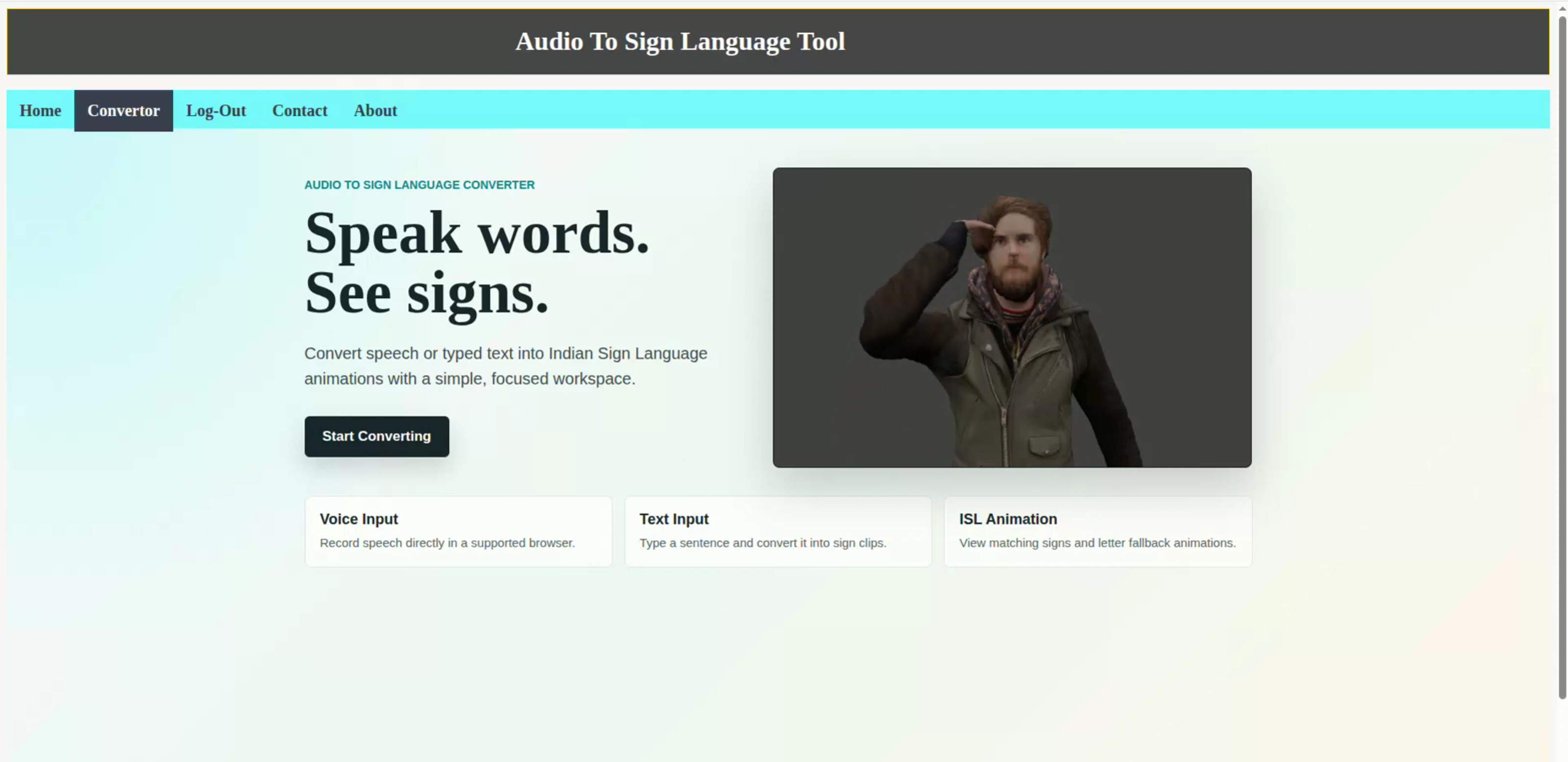
The Home Page module introduces the application and provides users with a starting point for using the converter. It displays a visually attractive landing page with a sign language animation preview and a call-to-action button that directs users to the converter page.
User Authentication Module
The User Authentication module manages registration, login, and logout. Django's built-in authentication forms are used to create users, validate login credentials, and manage authenticated sessions.
Speech Input Module
The Speech Input module allows users to speak into the microphone and convert their speech into text. It uses the browser's Web Speech API through JavaScript. The user can select a language option before recording.
Manual Text Input Module
The Manual Text Input module allows users to type text directly when they do not want to use the microphone or when the browser does not support speech recognition.
Translation Module
The Translation module converts input text into English before natural language processing. This helps the application process supported non-English input more consistently.
Text Preprocessing Module
The Text Preprocessing module prepares the input sentence for sign language animation matching. It uses NLTK to tokenize the sentence, tag parts of speech, remove unnecessary words, detect tense, and legitimatize words.

Technology Stack

Python Data Science & Analytics HTML CSS3 Django SQLite

Project Screenshots 2 Screenshots

Screenshot 1 of Speech to Sign Converter
Screenshot 1
Screenshot 2 of Speech to Sign Converter
Screenshot 2

Project Abstract

The Audio Speech to Sign Language Converter is a web-based application designed to reduce the communication gap between hearing users and people who rely on sign language. The system accepts spoken input through a browser microphone or typed text from the user, processes the sentence, extracts meaningful keywords, and displays the corresponding Indian Sign Language animation clips. The project is developed using the Django web framework for backend routing, authentication, and page rendering. The frontend uses HTML, CSS, and JavaScript, while browser-based speech recognition is handled through the Web Speech API. Natural Language Toolkit (NLTK) is used for text preprocessing tasks such as tokenization, part-of-speech tagging, stop-word removal, tense detection, and lemmatization. The application also supports translation of entered text into English before processing, which helps users provide input in different supported languages. After preprocessing, the system checks whether an animation clip is available for each processed word. If a complete word animation is not available, the word is broken into individual letters and the corresponding alphabet animations are displayed. This fallback approach ensures that the system can still provide visual output even when the exact word is not present in the animation dataset. The application includes user registration, login, logout, static animation assets, an interactive converter page, and informational pages such as Home, About, and Contact. Overall, this project demonstrates how speech recognition, natural language processing, and web technologies can be combined to create an accessible communication aid using sign language animations.

Project Kit Includes

Complete Source Code
Database Schema & Setup Guide
Project Report Template
Completion Certificate
Installation & Deployment Guide

Free Hands‑on Training

100% FREE · LIVE CLASSES

Full‑stack / AI Mentorship

Get 20+ hours of live training covering the exact stack used in this project. Includes code review, doubt clearing, and viva preparation.

Claim Free Training Seat

Explore More Projects

Browse 150+ academic and industry-ready projects across AI, Web, Data Science, and Cloud domains.

View All Projects

Enroll Now

Leave your details and we will get back to you shortly.

Please enter your full name
Please enter a valid email
Please enter a valid phone number (7-15 digits)
Please enter your college name
Application submitted successfully.
Chat on WhatsApp Anvitha Infotech • Enhanced Footer